Native Mobile Apps for iOS & Android: Your Entire Facility in Your Pocket
Empower maintenance technicians, facility managers, and field teams with full-featured mobile apps for iOS and Android. Complete work orders, track time, scan QR codes, capture photos, create requests, and access all FacilityFlow features—even offline with bi-directional sync. No compromises, no limitations.
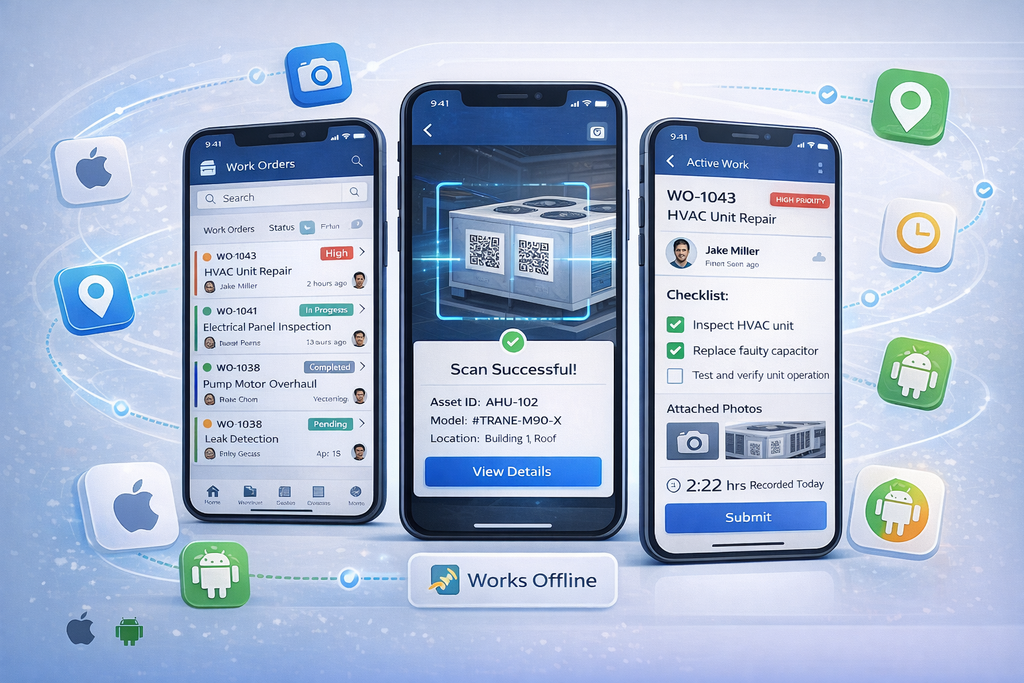
True Native Apps, Not Mobile Web Wrappers
- Many CMMS systems offer "mobile access" through responsive websites that barely work on small screens. FacilityFlow takes a different approach: fully native iOS and Android apps built specifically for mobile devices, delivering the performance, offline capability, and user experience your field teams deserve.
- Our mobile apps aren't limited versionsâ€"they provide complete access to work orders, assets, inventory, inspections, time tracking, and more. Technicians can work all day in areas without WiFi or cellular coverage, with all data automatically syncing when connectivity is restored.
- Every feature is optimized for mobile: large touch targets, simplified navigation, camera integration, QR code scanning, GPS tracking, digital signatures, and voice notes. The result: faster work completion, better data quality, and happier technicians.
The Numbers Speak for Themselves
Real results from real customers
Feature Parity
Full platform access, not limited mobile version
Works Without Internet
Bi-directional sync when connectivity returns
App Store Rating
Based on 12,000+ reviews across iOS & Android
Lightweight Install
Fast download, minimal storage required
Available on iOS 14+ and Android 8+
Everything You Need in the Field
📱 Complete Work Orders from Anywhere
Manage work orders from your phone: view/filter by priority, status, asset, location; accept/reject assignments; update status in real-time; track time (start/stop/pause); complete digital checklists with photo requirements; capture photos/videos with annotations; add voice notes/comments; log parts/materials; capture digital signatures; work offline with automatic sync; mark jobs complete.
🔳 Instant Asset Information with QR/Barcode Scanning
Scan QR codes or barcodes (QR, Data Matrix, Code 128/39, EAN, UPC) on equipment, inventory, or locations to access maintenance history, manuals, parts lists, and more. Create work orders, log meter readings, generate/print QR labels, do bulk scans, and work offline with cached data.
📸 Professional Photo & Video Documentation
Capture HD photos (up to 4K) and videos with audio in work orders or asset records. Annotate with arrows, text, shapes, freehand; compare before/after; automatic compression; EXIF data (timestamp, GPS, device info); batch upload; offline support; searchable gallery.
📍 GPS Tracking & Location-Based Features
Automatic location tracking shows technicians in real-time with optional privacy controls. Geofence clock-in/out, automatic check-in at work orders, turn-by-turn navigation, route optimization, location-based assignments, GPS in photos/work orders, travel tracking, and indoor positioning via Bluetooth beacons.
🔄 Full Offline Functionality with Automatic Sync
Work offline in basements, remote sites, or areas without connectivity. Complete work orders, capture/annotate photos, update status, add notes, track time, scan QR codes, and view recent assets. Automatic bi-directional and background sync, conflict resolution, sync queue visibility, and low-data mode.
✍️ Digital Signatures & Custom Forms
Capture technician, customer, and supervisor signatures for work orders, deliveries, inspections, and approvals. Use custom forms with multiple signature fields, timestamps, GPS, photo requirements, checkboxes, dropdowns, dynamic fields, customer ratings, PDF generation, and automatic email.
📦 Real-Time Inventory & Parts Tracking
Search inventory, scan parts barcodes/QR codes, check real-time stock, issue/receive parts, transfer between locations, perform cycle counts, get low-stock alerts, view photos/specs/usage history, reserve parts, and work offline with automatic sync.
⏱️ Automatic Time Tracking & Labor Costing
Track work order time with start/stop timers that run in background, auto-pause for breaks, support multiple timers, geofence clock-in/out, time rounding, overtime, labor rates, real-time cost calculation, timesheet approval, payroll export, and historical reporting.
Native Apps vs. Mobile Web: Why It Matters
Native apps offer fast performance, offline mode, camera and QR scanning, GPS tracking, push notifications, file access, biometric login, app store presence, automatic updates, and a smooth native experience. Mobile web works in the browser but is slower, lacks offline support, and has limited access to native features
See the Apps in Action

Technical Details & Requirements
iOS App vs Android App:
- Minimum OS Version:
- iOS: 14.0 or later
- Android: 8.0 (Oreo) or later
- Supported Devices:
- iOS: iPhone 6S and newer, iPad (5th gen+)
- Android: 99% of Android devices (2018+)
- App Size:
- iOS: 45 MB
- Android: 38 MB
- Offline Storage:
- Up to 5 GB cached data on both platforms
- Camera Requirements:
- Rear camera (8MP+) required for both
- Biometric Support:
- iOS: Face ID, Touch ID
- Android: Fingerprint, Face Unlock
- Permissions Required:
- iOS: Camera, Location, Photos, Notifications
- Android: Camera, Location, Storage, Notifications
- Languages Supported:
- English, Spanish, French, German, Portuguese
- Architecture:
- iOS: Native Swift
- Android: Native Kotlin
- Update Frequency:
- Monthly auto-update for both platforms
Security Features:
- ✅ SSL/TLS encryption for all data transmission
- ✅ Biometric authentication (Face ID, Touch ID, Fingerprint)
- ✅ PIN/passcode lock option
- ✅ Auto-logout after inactivity (configurable)
- ✅ Remote wipe capability (admin can wipe app data remotely)
- ✅ Certificate pinning to prevent man-in-the-middle attacks
- ✅ Encrypted local storage (AES-256)
- ✅ SOC 2 Type II compliant
Performance Metrics:
- App launch time: <2 seconds (cold start)
- Photo upload: <3 seconds per photo (on 4G)
- Sync time: <10 seconds for typical work order updates
- Battery usage: <5% per hour of active use
- Offline capacity: 30 days of data cached locally
Get Started in Minutes, Not Months
Most teams are live and productive within 3 days
Download from App Store or Google Play
Search for "FacilityFlow" in the App Store (iOS) or Google Play Store (Android) and tap Install. The app is free to download and requires a FacilityFlow account to use.
Sign In with Your FacilityFlow Credentials
Use the same email and password you use for the web app. First-time setup takes about 30 seconds to download your profile, assigned work orders, and recent asset data.
Access Your Work Orders Immediately
Your assigned work orders, assets, and inventory appear instantly. Enable location services for GPS tracking and geofencing. Grant camera permissions for photos and QR scanning. You're ready to work!
Everything Field Teams Need
🗂️ Work Management
View/filter work orders, accept/reject assignments, update status, complete digital checklists, track time (start/stop/pause), add photos/videos with annotation, add voice notes/comments, capture digital signatures, mark work order completion, show priority/SLA indicators, use recurring work templates.
📦 Assets & Inventory
QR/barcode scanning, asset search and lookup, view maintenance history, access equipment manuals/docs, log meter readings, search inventory, check stock levels, issue parts to work orders, receive/transfer stock, cycle counts and adjustments, low-stock alerts, part photos and specifications.
🧰 Features & Tools
GPS tracking/navigation, geofence clock-in/out, full offline mode, push notifications, biometric login, multi-language support, dark mode, custom forms, safety checklists, inspections/audits, dashboards and analytics, team messaging.
Mobile App FAQs
What Field Teams Are Saying
Hear from teams using Docmet every day
“The offline mode is a game-changer. Our production floor has terrible WiFi coverage, but I can still complete work orders, scan equipment QR codes, and upload photos—everything syncs automatically when I'm back in the office. This app has made my job so much easier.”
Mobile Apps Work Seamlessly with These Features
Empower Your Field Team Today
Download FacilityFlow mobile apps and give your technicians the tools they need to work faster, smarter, and more efficiently. Free to download, included with all subscriptions.